Intellijel’s Cascadia isn’t just another desktop semi-modular—it’s a playground for expressive control, especially when paired with MPE (MIDI Polyphonic Expression) controllers. In this official Intellijel walkthrough, Matt demonstrates how Cascadia’s MPE mode transforms the synth’s interaction, letting gestures from devices like Ableton Push 3, Linnstrument, and Osmose shape everything from filter cutoff to wave folding. The video is a practical guide to setting up MPE, translating nuanced MIDI gestures into control voltages, and patching up dynamic, morphing sounds. If you’re curious about how MPE can inject new life into your modular workflow, this is a must-watch.
3. August 2024
MILES
Intellijel Cascadia Meets MPE: Expressive Control in Modular Patching
Ableton Push 3, EarthQuaker Devices Afterneath, EHX Memory Boy, Expressive E Osmose, Intellijel Cascadia, Moog MF Delay, Roger Linn Design Linnstrument 128, Strymon Timeline
Cascadia: Modular Meets MPE Expression
Intellijel’s Cascadia is introduced as a modular synthesizer that now boasts MPE (MIDI Polyphonic Expression) integration, expanding its expressive potential beyond traditional mono synth boundaries. While Cascadia itself is a mono instrument, the focus here is on using the multidimensional gestures from MPE controllers to shape sound parameters in real time. This approach shifts the paradigm from simple note triggering to a more tactile, performance-oriented interaction, where physical gestures morph patches on the fly. The video sets the stage for a deep dive into how these expressive controls can be mapped to various aspects of the Cascadia’s architecture, inviting users to rethink how they play and patch their modular systems.

"This completely changes how you interact with Cascadia in a good way."
© Screenshot/Quote: Intellijel (YouTube)
Setting Up MPE Mode: MIDI Plumbing and Gesture Mapping
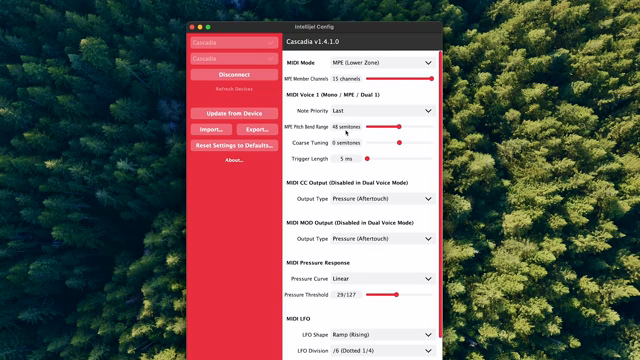
"48 semitones may sound like a lot, but typically you will constrain this amount on the controller that you're using, so it's always best to give yourself some literal wiggle room."
© Screenshot/Quote: Intellijel (YouTube)
The walkthrough begins with connecting Cascadia to a computer and launching the Intellijel Config App, a necessary step for accessing the synth’s advanced MIDI settings. Matt demonstrates how to set the MIDI mode to MPE lower zone with 15 channels, ensuring that the synth is ready to receive the full range of expressive data from compatible controllers. He notes that users working with other MIDI gear may want to restrict channel allocation to avoid conflicts, a nod to the realities of complex setups.
Next, the pitch bend range is set to a generous 48 semitones, though Matt points out that most users will want to constrain this on the controller side for practical playability. The crucial step is mapping MPE gestures to control voltage: MIDI CC out is set to CC74 (the standard for MPE timbre), and users can choose between bipolar or unipolar response to match their controller. For pressure and aftertouch, MIDI mod is assigned accordingly, with sensitivity tuned via the pressure response menu. The advice is pragmatic—start with the suggested settings and tweak as needed, since different controllers respond differently. Once configured, Cascadia is ready to translate nuanced gestures into voltage, opening the door to new performance techniques.
Patch Examples: Gestures in Action
With MPE mode active, the video moves to hands-on patching. The first example routes MIDI CC to the VCF, so vertical movement on the controller pad modulates the filter cutoff. This instantly makes the patch more responsive and alive, as subtle finger movements sweep the filter in real time. Next, pressure from the pad is patched to the wave folder, allowing dynamic control over the fold amount—again, all from the controller’s surface. The folded signal is then routed back through the mixer and VCF, further enriching the timbral palette.
Matt offers a practical tip: use the utility section’s multiples to send MPE modulation to several destinations at once, multiplying the expressive possibilities. He also experiments with patching the vertical axis to control delay time on an external analog delay, and demonstrates using a fixed CV offset to precisely dial in the modulation range. The final example patches pressure to the VCOA index modulation, showing how even basic setups can become highly expressive. Throughout, the focus is on how MPE gestures can be mapped creatively, turning the Cascadia into a responsive instrument for nuanced sound design.

"So already this basic patch is feeling pretty expressive using an MPE controller."
© Screenshot/Quote: Intellijel (YouTube)
Controller Compatibility and Creative Potential

"As you can see and hear, it's a lot of fun to interact with Cascadia in this way for more expressive and experimental results."
© Screenshot/Quote: Intellijel (YouTube)
The video wraps up by highlighting Cascadia’s compatibility with a range of MPE controllers, including Ableton Push 3, Linnstrument, and Osmose. This flexibility means users aren’t locked into a single workflow—any MPE-capable device can inject new life into the synth’s architecture. The closing patches and sound examples underscore how these expressive inputs can transform both performance and experimentation, making Cascadia a versatile hub for creative modular play. For those keen to push their sound design further, the integration of MPE opens up a wealth of possibilities for real-time control and sonic exploration.
This article is also available in German. Read it here: https://synthmagazin.at/intellijel-cascadia-trifft-mpe-ausdrucksstarke-kontrolle-im-modular-patching/
Watch on YouTube:
Latest articles
Watch on YouTube:
Visit the channel:
https://www.youtube.com/intellijel
https://www.youtube.com/intellijel
Links from intellijel:
website: https://intellijel.com
forum: https://forum.intellijel.com
instagram: https://instagram.com/intellijel
facebook: https://www.facebook.com/intellijel
Sponsored links:
If you purchase via these links, we may earn a small commission – at no extra cost to you. The link opens an Amazon keyword search, and results may vary depending on availability.
Ableton Push 3
🔗 Check price on Amazon
🔗 Check price on Amazon
EarthQuaker Devices Afterneath
🔗 Check price on Amazon
🔗 Check price on Amazon
EHX Memory Boy
🔗 Check price on Amazon
🔗 Check price on Amazon
Expressive E Osmose
🔗 Check price on Amazon
🔗 Check price on Amazon
Intellijel Cascadia
🔗 Check price on Amazon
🔗 Check price on Amazon
Moog MF Delay
🔗 Check price on Amazon
🔗 Check price on Amazon
Roger Linn Design Linnstrument 128
🔗 Check price on Amazon
🔗 Check price on Amazon
Strymon Timeline
🔗 Check price on Amazon
🔗 Check price on Amazon