Frap Tools, the Italian maestros of modular design, take a deep dive into the art of recreating Keith Emerson’s legendary Karn Evil 9 sequencer stunt using their Usta sequencer. Rather than chasing note-for-note accuracy, this video zeroes in on the mechanics of programming a sequence that accelerates into audio-rate chaos and then stops itself—no frantic knob twiddling required. Expect a patch-oriented exploration, with the Usta’s multi-track flexibility, voltage slides, and clever gate tricks all put to the test. If you’ve ever wondered how to get your modular rig to pull off a self-destructing, Emerson-style climax, this is a must-watch.

19. March 2025
MILES
Frap Tools Usta: Sequencing the Emerson Trick – Modular Mayhem in Motion
Frap Tools 321, Frap Tools Bagài, Frap Tools Brenso, Frap Tools Kunsa, Frap Tools USTA
Setting the Stage: Usta as the Modular Conductor
The video opens with Giovanni from Frap Tools introducing the ambitious goal: to emulate the wild, accelerating sequence at the end of Emerson, Lake & Palmer’s Karn Evil 9. Rather than simply copying the notes, the focus is on capturing the technique—the sequence that speeds up to a frenzied climax and then halts with a bang. The Usta sequencer is positioned as the central tool for this experiment, chosen for its multi-track capabilities and flexibility.
The patch is built around an external clock driving the Usta, with two Brenso oscillators blended via the 321 submixer, and noise from Bagai. All signals are routed through a Kunsa filter, pinged by a gate track from the sequencer. The Bagai module allows for noise colour tuning, and the 321 can push extra gain into the filter for added aggression. This setup lays the groundwork for the evolving sequence, echoing the modular ethos of patching for behaviour rather than just sound.
Accelerating to Mayhem: Programming Progressive Speed
With the foundation in place, the demonstration shifts to programming the Usta for progressive speed changes. Instead of manually sweeping the clock, as seen in some tutorials, Giovanni opts to automate the acceleration. Usta’s four-track design allows each track to run at its own speed, so track two is set up to control the tempo in discrete stages.
By assigning each stage of track two a length matching the full pattern of track one, and programming a sequence of control voltages that increment by 0.5V per stage, the patch achieves a stepwise acceleration. These voltages are patched to modulate Bagai, and the CV attenuverter is used to intensify the effect. The result is a sequence that ramps up in speed, moving towards the audio-rate frenzy that defines the original performance’s climax.
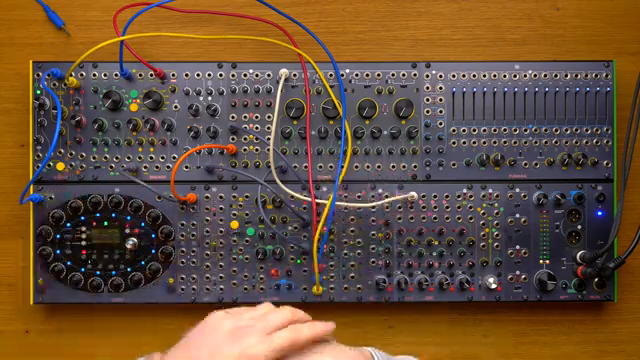
"I would like to recreate this effect by programming the machine to speed up every time it plays a sequence."
© Screenshot/Quote: Fraptools (YouTube)
Smoothing the Ride: Voltage Slides for Seamless Transitions
"I can simply set all those stages to slide into one another, so I will have a continuous sweep of voltage from 0 to 5.5."
© Screenshot/Quote: Fraptools (YouTube)
As the sequence accelerates, a problem emerges: the changes between stages are a bit too abrupt, causing stepped jumps in tempo. To address this, Giovanni leverages Usta’s ability to slide between voltage stages. By enabling slides, the control voltages transition smoothly, creating a continuous ramp from 0 to 5.5V.
This approach not only solves the stepping issue but also introduces a more organic, linear acceleration. The demonstration highlights a subtle pitfall—integrating slides can affect how the sequence starts, as the ramp may begin from the last played value. Adjustments are made to ensure each stage integrates correctly, showing the importance of careful sequencing when pushing a module to its limits.
Hands-Free Finale: Gate Tricks to Stop the Sequence
The next challenge is to make the sequence stop itself, just as in Emerson’s live performance—no manual intervention allowed. Giovanni sets up a gate track on Usta’s track two, using a constant high gate as a run signal patched into the auxiliary input. Usta’s project menu offers several run options, and after some trial and error, the appropriate mode is selected to allow the sequence to halt when a low gate is received.
By programming an extra stage with a low gate at the end of track two, the sequence is designed to incrementally speed up and then stop dead at the final stage. This cross-patching of gate outputs to auxiliary inputs is a classic modular move, demonstrating how Usta’s architecture can be bent to creative ends.
The result is a self-terminating sequence that mirrors the drama of the original performance. The approach is both elegant and slightly hacky—a testament to the flexibility of modular sequencing when you’re willing to experiment with signal routing.
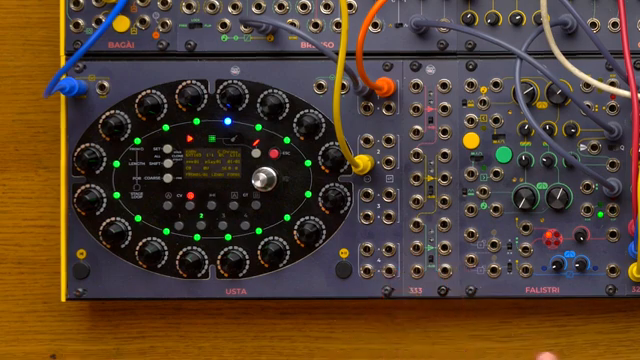
"Now we have to find out how to make the sequence stop when it reaches our last stage."
© Screenshot/Quote: Fraptools (YouTube)
Explosive Coda: Noise, Filters, and the Final Bang
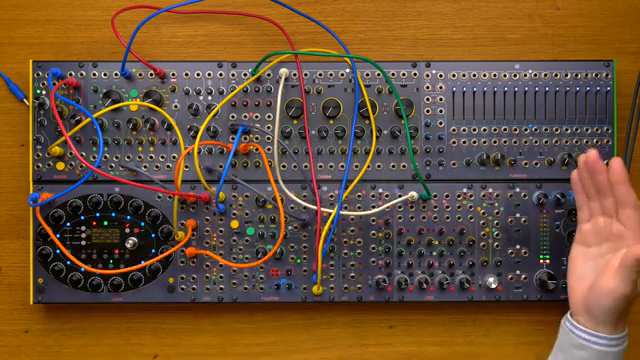
"It really tested the limits of the Usta sequencer and on the other hand it really improved our parametric thought."
© Screenshot/Quote: Fraptools (YouTube)
No Emerson homage would be complete without a final explosion. To achieve this, Giovanni duplicates the noise signal and cross-patches it to another Kunsa filter, removing the original filter from the mix and driving the new one into maximum distortion. The initial idea was to use a gate from track two to trigger the explosion, but the stage was too short to produce a meaningful effect.
The solution is to create a third track on Usta, mirroring the structure of track two but with a final stage dedicated to firing a gate at the precise moment. This gate is patched to the filters, delivering the climactic burst of noise that caps off the sequence. The demonstration ends with a nod to the value of pushing a sequencer to its extremes—not just to mimic a classic, but to expand one’s own patching imagination.
This article is also available in German. Read it here: https://synthmagazin.at/frap-tools-usta-das-emerson-trick-experiment-modularer-wahnsinn-in-bewegung/
Watch on YouTube:
Latest articles
Watch on YouTube:
Visit the channel:
https://www.youtube.com/FrapTools
https://www.youtube.com/FrapTools
Links from FrapTools:
website: https://frap.tools
instagram: https://instagram.com/fraptools
facebook: https://www.facebook.com/fraptools
twitter: https://twitter.com/fraptools
soundcloud: https://soundcloud.com/fraptools
Sponsored links:
If you purchase via these links, we may earn a small commission – at no extra cost to you. The link opens an Amazon keyword search, and results may vary depending on availability.
Frap Tools 321
🔗 Check price on Amazon
🔗 Check price on Amazon
Frap Tools Bagài
🔗 Check price on Amazon
🔗 Check price on Amazon
Frap Tools Brenso
🔗 Check price on Amazon
🔗 Check price on Amazon
Frap Tools Kunsa
🔗 Check price on Amazon
🔗 Check price on Amazon
Frap Tools USTA
🔗 Check price on Amazon
🔗 Check price on Amazon