Doctor Mix is back, and this time he’s armed with a custom MIDI Rhodes that’s been souped up at the Rhodes Factory in Leeds. Forget polite piano demos—this is a full-on live rig assault, with Camelot software pulling the strings and a stack of synths waiting for orders. If you’ve ever wondered how to turn a single keyboard into a five-headed groove monster, Doctor Mix’s energetic, sometimes over-the-top style is your ticket. Expect layers, splits, and a few cheeky tricks—plus a reminder that some sounds just have to be heard to be believed.

3. January 2026
SPARKY
Doctor Mix’s MIDI Rhodes Rave: One Keyboard to Rule Them All
C15, Camelot, Minimoog (Geddy Lee Edition), Modi X, Rhodes MK8, Trigon
MIDI Rhodes: The Sonic Swiss Army Knife
Doctor Mix kicks things off with his custom MIDI Rhodes, freshly modded at the Rhodes Factory in Leeds. This isn’t your gran’s living room piano—he’s taken the classic MK8 and wired it for total MIDI domination. The intro is pure Doctor Mix: high energy, a bit cheeky, and ready to show off what this Franken-Rhodes can do.
He wastes no time, giving us a taste of the untouched Rhodes sound—lush, punchy, and ready for action. But don’t get too comfortable. The real fun is about to start, and this keyboard is about to become the command centre for a whole arsenal of synths. If you thought one keyboard meant one sound, you’re in for a rude awakening.

"I mean, it's the MK8. What are you gonna do? It sounds this beautiful."
© Screenshot/Quote: Doctormix (YouTube)
Camelot: The Puppet Master
"Let's see what happens when I let it through with Camelot."
© Screenshot/Quote: Doctormix (YouTube)
Enter Camelot, the software that turns this rig from a polite dinner guest into a rave bunker. Doctor Mix shows how Camelot lets him control multiple instruments from the Rhodes, but with surgical precision—splits, layers, and selective MIDI routing all at his fingertips. No more clunky menus or accidental bass notes in the wrong octave.
He demonstrates how easy it is to assign the Minimoog bass to just a section of the keyboard, keeping the chaos contained. Camelot’s interface might look friendly, but under the hood it’s a street weapon for live control freaks. If you’re still juggling cables and praying for MIDI mercy, this is your wake-up call.
Layer Cake: Rhodes, Moog, and Friends
Doctor Mix starts stacking sounds like a DJ at closing time. First, the Minimoog bass gets dialled in—thick, simple, and ready to rattle the subs. He tweaks the range, adds an octave, and suddenly the Rhodes is sharing space with a Moog growl. It’s not just about more noise; it’s about carving out sonic territory for each layer.
Next up, he brings in the Modi X for a virtual Rhodes, doubling up with the real deal for that extra shimmer. The C15 joins the party with a favourite patch, and before you know it, the rig is a five-layer beast. Doctor Mix’s approach is all about playability—no endless menu diving, just hands-on control and instant results. If you want the full flavour, you’ll need to hear the blend for yourself.
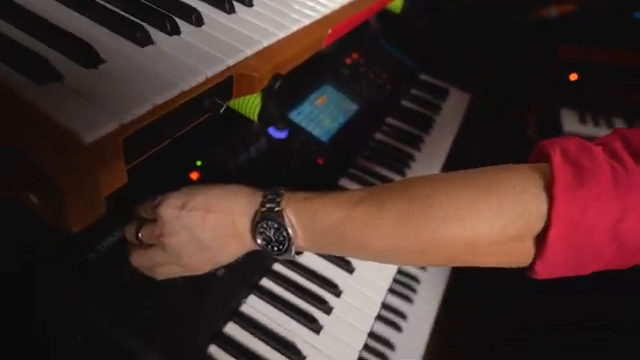
"So now we have a double Rhodes. A real one and a fake one."
© Screenshot/Quote: Doctormix (YouTube)
Velocity Remapping: Expressive Mayhem
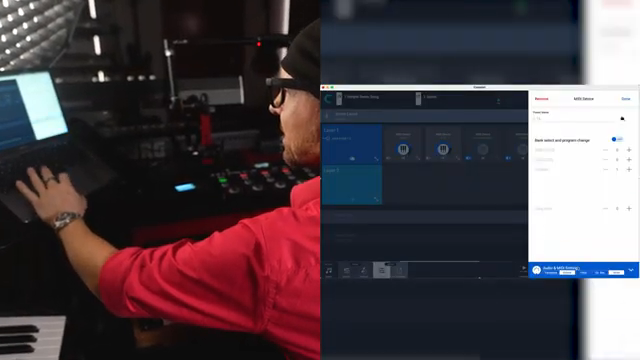
"So we go to MIDI Transformers, remapping curves, add a new remap."
© Screenshot/Quote: Doctormix (YouTube)
Now for the secret sauce: velocity remapping. Doctor Mix dives into Camelot’s MIDI Transformers to tweak how hard or soft each layer responds. It’s not just about volume—he’s sculpting the response so that every note can bark or whisper, depending on how you hit the keys.
He dials back the Modi X, adds a touch of Varipan, and fine-tunes the whole setup until the keyboard feels like an extension of his hands. This is where the rig stops being a pile of gear and starts acting like a real instrument. If you’re still playing with factory curves, you’re missing half the fun.
Five Layers, One Keyboard—Watch It Slam
Doctor Mix lines up all five layers—Rhodes, Minimoog, Modi X, C15, and Trigon—and lets rip. The result? A wall of sound that’s impossible to describe in words. If you want to feel the full impact, you’ll need to watch (and hear) the video yourself. Trust me, your laptop speakers won’t do it justice.
This article is also available in German. Read it here: https://synthmagazin.at/doctor-mix-midi-rhodes-rave-eine-tastatur-sie-alle-zu-steuern/
Watch on YouTube:
Latest articles
Watch on YouTube:
Visit the channel:
https://www.youtube.com/Doctormix
https://www.youtube.com/Doctormix
Links from Doctormix:
DoctorMix.com: https://doctormix.com
Facebook: https://facebook.com/doctormixdotcom
Twitter: https://twitter.com/doctormix
Instagram: https://instagram.com/doctormixdotcom
Tik Tok: https://tiktok.com/@doctormix.com
Sponsored links:
If you purchase via these links, we may earn a small commission – at no extra cost to you. The link opens an Amazon keyword search, and results may vary depending on availability.
Camelot
🔗 Check price on Amazon
🔗 Check price on Amazon
Minimoog (Geddy Lee Edition)
🔗 Check price on Amazon
🔗 Check price on Amazon
Modi X
🔗 Check price on Amazon
🔗 Check price on Amazon
Rhodes MK8
🔗 Check price on Amazon
🔗 Check price on Amazon
Trigon
🔗 Check price on Amazon
🔗 Check price on Amazon