Doctor Mix is back, caffeinated and armed with Camelot, showing us how to turn a humble master keyboard into the command centre of a rave bunker. Forget DAW limitations—this is live rig wizardry, layering hardware and software synths into a single, responsive beast. If you’ve ever wanted to run a synth party from one set of keys, Doctor Mix’s energetic walkthrough will either inspire you or make you question your own setup’s sanity. Expect scene switches, super patches, and a workflow that’s as over-the-top as the man himself.
16. January 2026
SPARKY
Doctor Mix Unleashes Camelot: One Keyboard to Rule Them All
Camelot, Kontakt, Moog Minimoog, Nonlinear Labs C15, Omnisphere, Sequential Trigon-6, Studiologic Numa Player Stage D, Studiologic SL88 GT, Yamaha MODX
Camelot: The Brain in the Bunker
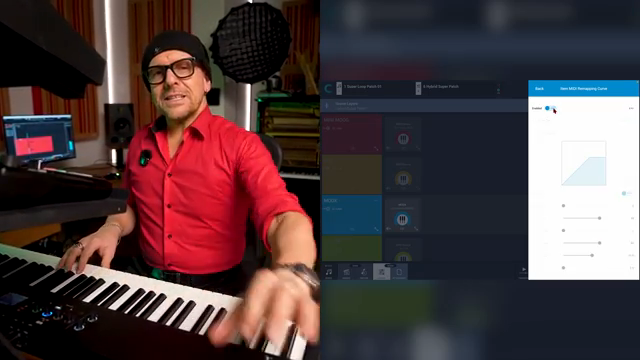
Doctor Mix wastes no time showing Camelot as the central nervous system of his live rig. One master keyboard, and suddenly you’re controlling a small army of synths—hardware and software—without breaking a sweat. The Numa Player Stage D, Modix, C15, Trigon, and Moog are all routed and layered like it’s a synth block party, and Camelot is the bouncer letting everyone in.
This isn’t your average DAW setup. Camelot’s real trick is making everything play nice together in real time, letting you swap, layer, and route instruments on the fly. If you’re tired of the usual DAW faff and want something that actually feels built for live chaos, this is the kind of central hub that turns a keyboardist into a one-person street weapon.

"It's like we're having a party here, inter-synthesizer party."
© Screenshot/Quote: Doctormix (YouTube)
Super Patches: Layer Cake Mayhem
Layering sounds is where Camelot gets spicy. Doctor Mix builds ‘super patches’ by stacking pianos, pads, basses, and more—each with its own range and level, all from the same keyboard. The Moog gets its own bass zone, the Trigon 6 brings in extra flavour, and everything is mapped out so you’re not stepping on your own toes.
The beauty is in the details: you can mute, solo, and tweak each layer live, building up or breaking down your patch as the mood takes you. It’s not just about stacking sounds; it’s about controlling the chaos, and Camelot gives you the tools to do it without diving into menu hell. If you want to see how deep the rabbit hole goes, you’ll need to watch the video—words can’t do the layering justice.
Scene Switches: No Dead Air Allowed
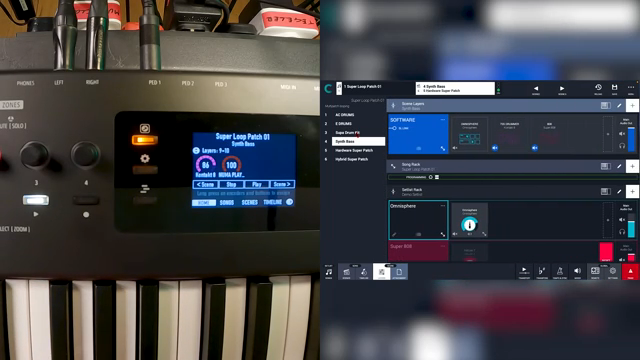
"Without even having to touch anything, all I need to do is I press this. And now I'm on the next patch, which is an Omnisphere bass."
© Screenshot/Quote: Doctormix (YouTube)
One of Camelot’s killer features is instant scene switching. Doctor Mix jumps between mega patches with a single button press, keeping the sound flowing without a hiccup. Whether it’s swapping drum kits or flipping from hybrid to in-the-box setups, there’s zero interruption—just seamless transitions that would make most DAWs weep. For live performers, this is the difference between a rave and a trainwreck.
Split Personality: Real-Time Tweaks and Velocity Curves
Camelot isn’t just about brute force layering—it’s about finesse. Doctor Mix shows off real-time adjustments, letting you remap velocity curves and fine-tune keyboard splits on the fly. Want the Moog only on the low end? Sorted. Need to adjust the feel for a particular synth? The remapping curves are a couple of clicks away.
This level of control means you can actually play expressively, not just trigger a wall of mush. It’s a godsend for live musicians who need their rig to respond like an instrument, not a spreadsheet. Again, the real magic is in the workflow—if you’re serious about performance, you’ll want to see how Doctor Mix dials it all in mid-jam.
Workflow in Action: The Sound of Synth Mayhem
The last stretch of the video is pure performance flex. Doctor Mix runs through dynamic combinations, adding and subtracting layers, switching scenes, and showing off the full Camelot workflow in real time. It’s a masterclass in live rig control, and the sound combinations are as wild as his enthusiasm. If you want to hear what this setup can really do, you’ll need to crank the video and let the synth party wash over you.

"It means that basically I can connect anything to anything."
© Screenshot/Quote: Doctormix (YouTube)
This article is also available in German. Read it here: https://synthmagazin.at/doctor-mix-entfesselt-camelot-eine-tastatur-sie-alle-zu-steuern/
Watch on YouTube:
Latest articles
Watch on YouTube:
Visit the channel:
https://www.youtube.com/Doctormix
https://www.youtube.com/Doctormix
Links from Doctormix:
DoctorMix.com: https://doctormix.com
Facebook: https://facebook.com/doctormixdotcom
Twitter: https://twitter.com/doctormix
Instagram: https://instagram.com/doctormixdotcom
Tik Tok: https://tiktok.com/@doctormix.com
Sponsored links:
If you purchase via these links, we may earn a small commission – at no extra cost to you. The link opens an Amazon keyword search, and results may vary depending on availability.
Camelot
🔗 Check price on Amazon
🔗 Check price on Amazon
Kontakt
🔗 Check price on Amazon
🔗 Check price on Amazon
Moog Minimoog
🔗 Check price on Amazon
🔗 Check price on Amazon
Nonlinear Labs C15
🔗 Check price on Amazon
🔗 Check price on Amazon
Omnisphere
🔗 Check price on Amazon
🔗 Check price on Amazon
Sequential Trigon-6
🔗 Check price on Amazon
🔗 Check price on Amazon
Studiologic Numa Player Stage D
🔗 Check price on Amazon
🔗 Check price on Amazon
Studiologic SL88 GT
🔗 Check price on Amazon
🔗 Check price on Amazon
Yamaha MODX
🔗 Check price on Amazon
🔗 Check price on Amazon