Doctor Mix, never one for subtlety, dives headfirst into the AI-powered chaos of ACE Studio—now with real VST plugin support. Forget locked-in stock effects: this is about dragging your own filthy favourites straight into the virtual rave bunker. With his trademark energy and a dash of cheek, Doctor Mix shows off the new Stem Splitter Custom Mode, surgically extracting synths from his own tunes and rebuilding the track with classic plugin chains. If you think AI production is limp, think again—this workflow could kick your next remix into overdrive. But trust me, you’ll want to see (and hear) the full madness in the video.
VSTs Invade the AI Bunker
Doctor Mix wastes no time letting us know that ACE Studio’s got a serious new trick up its sleeve: proper VST plugin support. No more caged in by bland internal effects—now you can lob your own trusted compressors, reverbs and dirty saturators straight into the AI workflow. For anyone who’s ever raged at a DAW’s anaemic built-ins, this is a breath of fresh, slightly overdriven air.
The workflow shift is real. Instead of dreading the moment you have to export stems and hop DAWs just to slap some character on a sound, you keep it all inside ACE Studio. Doctor Mix’s style is all about energy and he makes it clear this update is more than a gimmick: it’s a full-on workflow gamechanger for anyone who wants their mix to slap, not sleep.
"You can load up VST effects on a VST track."
© Screenshot/Quote: Doctormix (YouTube)
Custom Stem Extraction: AI on the Operating Table
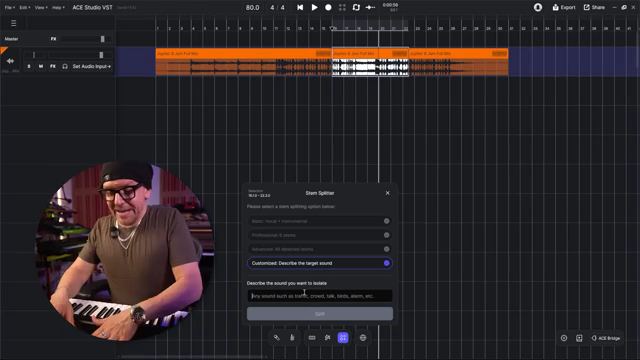
"Extract the low synth sound, not the sequencer synthesizer, but the drone-like one."
© Screenshot/Quote: Doctormix (YouTube)
Here’s where things get surgical. The new Stem Splitter Custom Mode lets you describe exactly what you want to extract—none of this fixed ‘vocals-or-drums’ nonsense. Doctor Mix puts it to the test, isolating a specific synth from his own track just by describing it, not by relying on some clunky preset. The AI works its voodoo and spits out a shockingly clean synth stem, leaving all the other noise behind.
This isn’t just a neat trick; it’s a creative grenade for remixers and sound scavengers. Doctor Mix’s excitement is justified—the process is quick, and the isolated stem is so clean you’ll start to question your own ears. It’s the kind of tool that’ll make you want to tear apart every track you own, just to see what you can dig out.
A/B Showdown: Plugins vs. The Boring Old Way
Let’s get real: nothing proves a point like a proper A/B. Doctor Mix lines up the raw, AI-extracted synth and then runs it through his weaponised plugin chain—EQ, compression, reverb, delay, and a healthy dose of saturation. Hearing the before and after is like swapping a budget toaster for a full-on industrial grill. The difference isn’t subtle; it’s a night-and-day leap from ‘meh’ to ‘massive’.
You get to hear the transformation in real time, with every tweak and fader move making the sound punch harder and shine brighter. The video doesn’t hold your hand through every plugin setting (thankfully), but you see and hear enough to know that real VST support in ACE Studio isn’t just marketing fluff. It’s a sonic upgrade you can’t ignore.
Streamline or Die: Producer Workflow in Action
Doctor Mix doesn’t just talk about workflow—he blitzes through it. With everything from stem extraction to plugin chain building happening inside one DAW, the creative process is faster and less faffy. No more endless exporting, no more plugin envy. If you’re after a production rig that keeps your momentum rolling, this video is basically a blueprint for getting it done without ever leaving the AI rave bunker.
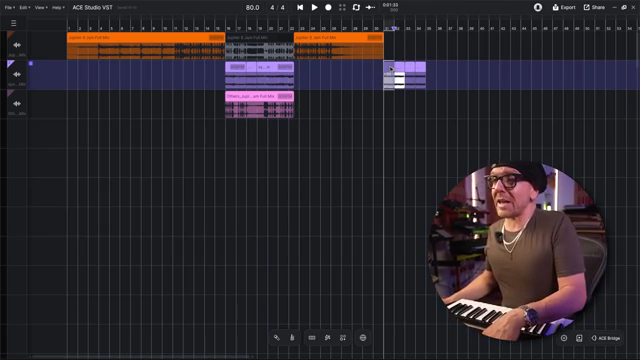
"A studio figured out the BPM straight up. No problem."
© Screenshot/Quote: Doctormix (YouTube)
Don’t Just Read—Hear the Madness Yourself
Honestly, there’s only so much text can do. The real magic of ACE Studio’s new features—and Doctor Mix’s wild remixing antics—has to be seen and heard to be believed. The video is packed with real-world demos, cheeky commentary, and enough plugin action to satisfy even the most gear-hungry producer. If you want to know if this combo actually delivers, don’t skip the video: your next track might just thank you.
This article is also available in German. Read it here: https://synthmagazin.at/doctor-mix-entfesselt-ace-studio-dreht-mit-echten-vsts-richtig-auf/
Watch on YouTube:
Latest articles
Watch on YouTube:
Visit the channel:
https://www.youtube.com/Doctormix
https://www.youtube.com/Doctormix
Links from Doctormix:
DoctorMix.com: https://doctormix.com
Facebook: https://facebook.com/doctormixdotcom
Twitter: https://twitter.com/doctormix
Instagram: https://instagram.com/doctormixdotcom
Tik Tok: https://tiktok.com/@doctormix.com
Sponsored links:
If you purchase via these links, we may earn a small commission – at no extra cost to you. The link opens an Amazon keyword search, and results may vary depending on availability.
ACE Studio
🔗 Check price on Amazon
🔗 Check price on Amazon