Arturia’s KeyLab mk3 aims to be more than just another MIDI controller—it’s pitched as a workflow accelerator for modern producers and performers. In this official video, Arturia’s Lena walks through the mk3’s architecture, from its velocity-sensitive keybed and RGB pads to its touch encoders and DAW integration. The focus is on how these digital tools, creative modes, and a robust software bundle can turn the mk3 into the nerve center of any studio or stage setup. We break down what’s actually demonstrated, where the workflow shines, and which features will appeal most to digital-centric musicians.
28. August 2024
LYRA
Arturia KeyLab mk3: Digital Control, Creative Flow – A Deep-Dive with Arturia
A Flagship for the Modern Creative
Arturia positions the KeyLab mk3 as its flagship MIDI controller, targeting both beginners and seasoned producers seeking a more enjoyable and personal workflow. The video opens with Lena introducing the mk3 as an intuitive and inspiring device, emphasizing its role as a central hub for music-making. The pitch here is clear: this isn’t just a keyboard, but a tool designed to streamline and enhance the creative process for today’s digital musicians.
The narrative leans heavily on the idea of workflow enhancement. Arturia wants users to see the mk3 as a premium, expressive controller that distills everything needed for production and performance into a single, accessible package. The focus is on making the act of music creation more fluid, fun, and tailored to individual needs—an ethos that runs through the entire presentation.
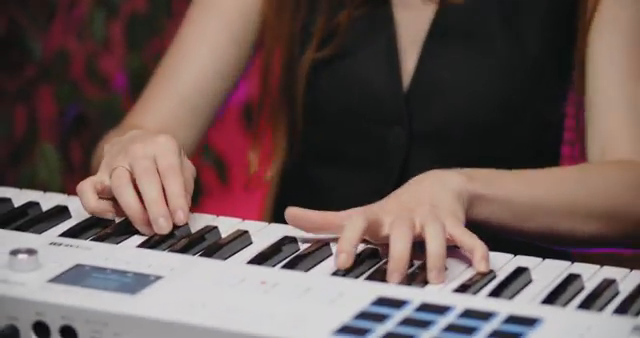
"Keylab MK3 is an inspiring and intuitive keyboard controller designed to make your music-making workflow more personal and enjoyable than before."
© Screenshot/Quote: Arturiaofficial (YouTube)
Hardware That Talks Back: Keys, Pads, and Encoders
"Keylab MK3 features nine touch-sensitive encoders, ideal for controlling your favorite virtual instruments or external devices, plus nine faders for controlling volume, effects, envelope shaping, and anything else in your DAW."
© Screenshot/Quote: Arturiaofficial (YouTube)
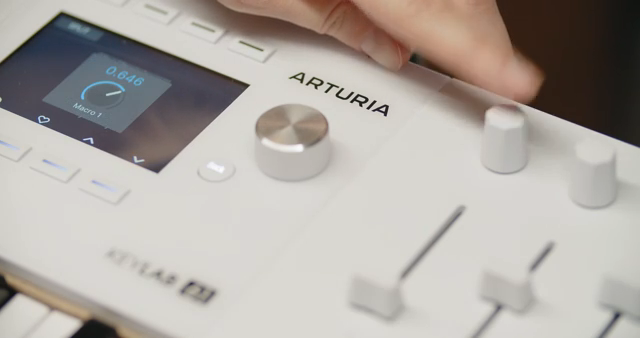
The KeyLab mk3’s hardware spec is built for tactile control and visual feedback. The velocity-sensitive, synth-action keybed is designed for comfort and versatility, supporting a range of playing styles. Arturia includes 12 RGB backlit, velocity- and pressure-sensitive pads, organized into four banks for a total of 48 MIDI destinations—ideal for triggering drums, samples, or clips in various DAWs. The pads’ velocity response is always visible on the display, and their default MIDI channel is 10, with flexible assignment depending on the operating mode.
Nine touch-sensitive encoders and nine faders provide hands-on control over virtual instruments, external gear, and DAW parameters. The bright display is central to the mk3’s workflow, showing real-time information about faders, knobs, and pads, as well as detailed MIDI and system settings. Navigation is handled via a main encoder and contextual buttons, allowing users to move through menus and make selections without menu-diving fatigue.
Transport controls, undo/redo, save, quantize, pitch/mod wheels, octave and transpose switches, and direct MIDI channel selection round out the front panel. The back panel offers USB-C connectivity, sustain, expression, and aux pedal inputs, plus full MIDI I/O—making the mk3 equally at home in computer-based and hardware-centric setups.
Performance Modes: Arpeggiator, Scale, and Chord Magic
Arturia showcases the mk3’s creative arsenal, starting with the arpeggiator. With a dedicated ARP button, users can instantly turn held notes or chords into looping sequences. The ARP menu, accessed by holding the button, exposes parameters like speed, direction, division, and a suite of randomization options—trip probability, random divisions, octaves, skips, gates, ratchet, and velocity. The Dice button generates random values across these parameters, injecting inspiration and unpredictability into the workflow.
Scale mode lets users lock the keybed to a chosen scale, ensuring every note stays in key—especially useful for live improvisation or rapid idea generation. Custom scales can be created by recording specific notes. Chord mode enables one-finger chords, with the ability to define up to 16-note user chords or select from presets. Additional creative tools like strum, voicing, and spread allow for nuanced chord articulation, and these modes can be combined for complex, harmonically rich performances.
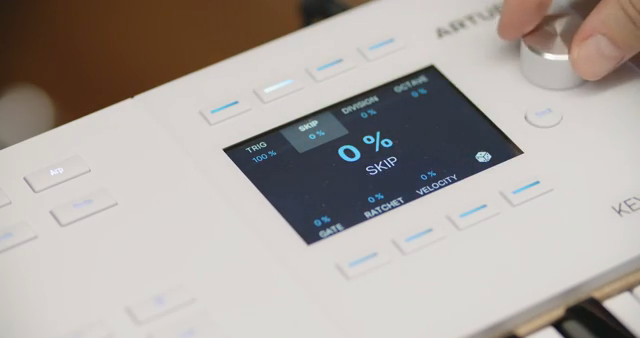
"Here you can define trip probability, as well as randomize divisions, octaves, skips, gates, ratchet, and velocity."
© Screenshot/Quote: Arturiaofficial (YouTube)
Integration: The DAW Chameleon
A major selling point is the mk3’s seamless DAW integration. Arturia highlights plug-and-play operation with up-to-date DAWs, thanks to custom mappings and support for MCU/HUI protocols. At launch, users can toggle between Arturia Mode (for Analog Lab and other Arturia software), DAW Mode (for deep DAW control), and User Mode (for custom setups). This flexibility allows the mk3 to adapt to a wide range of software environments without requiring tedious manual mapping.
The video references dedicated tutorials for specific DAWs, but the core message is that the mk3 is engineered to be instantly useful in any major production environment. The transport section and contextual controls are tailored to provide direct access to essential DAW functions, further streamlining the creative process for producers who move between different platforms.
Beyond the Basics: Customization and the Software Bundle

"The global settings allow you to define options such as velocity or aftertouch curves, pedal calibration, pad sensitivity or DAW protocols."
© Screenshot/Quote: Arturiaofficial (YouTube)
The mk3 isn’t just about out-of-the-box functionality—it’s designed for deep customization. The Settings button provides direct access to global and keyboard-specific settings from the hardware itself. Users can adjust velocity and aftertouch curves, calibrate pedals, tweak pad sensitivity, and select DAW protocols, all without needing a computer editor. The keyboard menu offers access to MIDI parts and advanced aftertouch options, supporting nuanced control for demanding setups.
Arturia includes a premium creative software bundle, positioning the mk3 as more than a generic MIDI controller. While the video doesn’t detail the bundle’s contents, the implication is that users get immediate access to high-quality sounds and tools that complement the hardware’s capabilities.
This combination of hardware flexibility and bundled software aims to make the KeyLab mk3 a central piece in any digital or hybrid studio. Arturia’s approach is to provide a controller that grows with the user, offering both immediate playability and the depth needed for long-term exploration.
This article is also available in German. Read it here: https://synthmagazin.at/arturia-keylab-mk3-digitale-kontrolle-kreativer-flow-ein-deep-dive-mit-arturia/
Watch on YouTube:
Latest articles
Watch on YouTube:
Visit the channel:
https://www.youtube.com/ArturiaOfficial
https://www.youtube.com/ArturiaOfficial
Links from ArturiaOfficial:
website: https://www.arturia.com
instagram: https://instagram.com/arturia_official
twitter: https://twitter.com/ArturiaOfficial
soundcloud: https://soundcloud.com/arturia-official/albums
Sponsored links:
If you purchase via these links, we may earn a small commission – at no extra cost to you. The link opens an Amazon keyword search, and results may vary depending on availability.
Arturia KeyLab MK3
🔗 Check price on Amazon
🔗 Check price on Amazon