Arturia’s AstroLab 1.5 firmware update is here, and it’s not just a minor tweak—it’s a thoughtful expansion aimed at serious stage and studio players who crave workflow enhancements and deeper integration. The official Arturia video, presented by Kari Aryeh, walks us through new creative locks for arpeggiator and chord/scale settings, streamlined MIDI program change support, and a notably improved playlist transfer system with Analog Lab. Add to that a fresh batch of instrument engines spanning classic analog to cinematic hybrids, and AstroLab’s digital core gets a significant boost. Let’s break down what’s actually new, how it’s demonstrated, and what this means for the AstroLab’s evolving role in modern performance rigs.
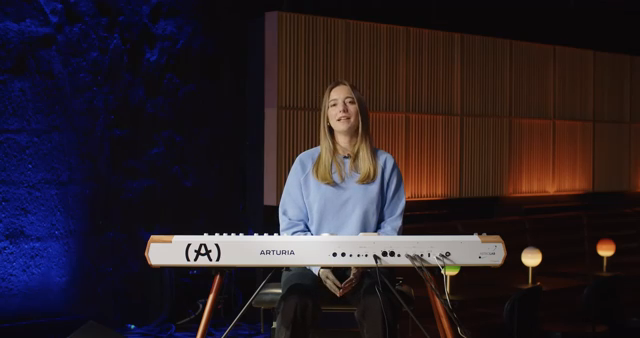
AstroLab 1.5: Aiming for Creative Control on Stage
Arturia introduces AstroLab 1.5 as a free firmware update, positioning it as a major step forward for performers who demand both flexibility and reliability from their stage keyboards. The video’s opening frames set the tone: this update is about empowering users with more creative control, tighter integration with external gear, and a smoother workflow between the AstroLab hardware and Arturia’s Analog Lab software. The emphasis is clearly on real-world performance needs, not just studio experimentation.
From the outset, Arturia’s presentation style is direct and user-focused, highlighting the practical benefits of the update rather than just listing features. The video promises a walkthrough of new instrument engines, MIDI program change support, seamless playlist transfers, and performance-oriented locks for arpeggiator and chord/scale settings. This signals a shift towards making AstroLab a more central, adaptable hub in both DAWless and hybrid setups, with a workflow that aims to keep up with the demands of modern keyboardists.
"Astrolab 1.5 is all about giving you more creative control, better integration with external gear, and a streamlined workflow between Analog Lab and your stage keyboard."
© Screenshot/Quote: Arturiaofficial (YouTube)
Locking In Your Groove: Arpeggiator and Chord/Scale Locks
"With Arp Lock enabled, all your Arp settings like direction, octave range, time division stay locked even when you change presets."
© Screenshot/Quote: Arturiaofficial (YouTube)
One of the headline features in AstroLab 1.5 is the ability to lock arpeggiator settings across preset changes—a deceptively simple tweak that has real implications for live consistency. The video demonstrates how users can long-press the Arp button to access a new Arp Lock option in the settings menu, allowing parameters like direction, octave range, and time division to persist as you browse different sounds. This means rhythmic patterns and grooves remain intact, even while auditioning new timbres mid-performance.
Chord and Scale Lock works in a similar fashion: long-pressing the Chord button reveals the option to keep custom chords, root notes, and scale types locked as you switch presets. The combination of these locks ensures that complex performance setups—like layered arps and harmonies—don’t fall apart when changing sounds. For keyboardists who rely on intricate setups, this is a clear workflow win, though the video focuses on the surface-level operation rather than diving into menu depth or edge-case scenarios.
MIDI Program Change: External Gear, Synchronized
AstroLab 1.5 adds support for sending MIDI program change messages whenever a preset is loaded, including within playlists. The video shows how holding Shift and Split opens the MIDI and Split settings menu, where users can assign bank, sub-bank, and program numbers for each part. These values are transmitted via the part’s MIDI output channel, giving performers the ability to synchronize preset changes across external synths, modules, or even lighting rigs.
Importantly, each parameter can be set to ‘off,’ offering granular control over what gets sent. This level of flexibility is ideal for complex stage setups where not every device needs to respond to every change. While the video demonstrates the setup process clearly, it doesn’t delve into latency, compatibility quirks, or how AstroLab handles simultaneous changes in multi-part arrangements—areas that would benefit from further real-world testing.
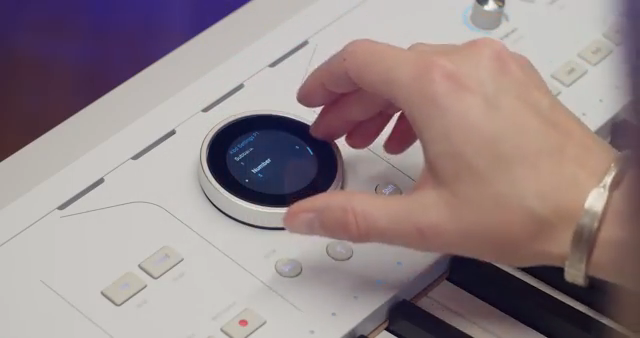
"These values will be sent via the parts MIDI output channel each time you load a new sound."
© Screenshot/Quote: Arturiaofficial (YouTube)
Playlist Transfers: Analog Lab and AstroLab, Finally in Sync
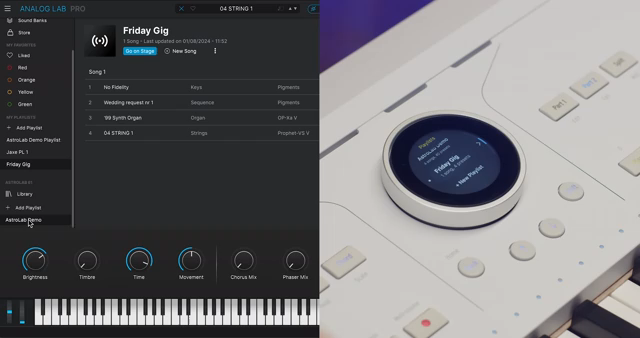
"The playlist appears in your Astrolab ready to play live."
© Screenshot/Quote: Arturiaofficial (YouTube)
Setlist management gets a significant upgrade with seamless playlist transfers between Analog Lab and AstroLab. The video walks through three methods: right-clicking a playlist to send it to AstroLab, using the three-dot menu, or simply dragging and dropping playlists between software and hardware sections. This makes it much easier to build, back up, and edit setlists, whether you’re prepping for a gig or collaborating remotely.
Transferring playlists from AstroLab back to Analog Lab is equally straightforward, supporting offline editing or sharing with other AstroLab users. The interface provides clear visual feedback to confirm where playlists will be dropped, reducing the chance of workflow errors. While the video highlights the ease of use, it doesn’t address how the system handles large or complex playlists, nor does it mention any limitations regarding custom mappings or metadata—points that may matter for power users.
New Engines: Analog Heritage and Cinematic Hybrids Expand the Palette
AstroLab 1.5 brings a substantial expansion to its instrument library, adding both classic analog emulations and modern cinematic textures. The update introduces MiniBrute V, a virtual take on Arturia’s own analog monosynth, alongside Synthex for lush vintage soundscapes and SEM V3 for creamy analog filter sweeps. The JP-8000 V engine is also added, bringing iconic supersaw leads and trance textures into the fold.
On the cinematic side, Augmented Yangtze delivers traditional Chinese-inspired timbres within a morphing, hybrid engine, while Augmented Mallets offers tuned percussion with layered effects. All previous Augmented instruments are also enhanced in version two, further broadening the expressive range available to performers. The video provides short audio demos of each engine, giving a taste of their character but stopping short of deep sound design exploration.
With these additions, AstroLab’s sonic palette becomes even more versatile, blending heritage analog, modern synthesis, and expressive acoustic sounds in a single hardware platform. The update clearly targets both live players seeking classic tones and composers looking for cinematic inspiration, though the depth of engine editing and integration into custom workflows is left for users to discover beyond the video.
This article is also available in German. Read it here: https://synthmagazin.at/arturia-astrolab-1-5-die-digitale-stage-workstation-waechst-weiter/
Watch on YouTube:
Latest articles
Watch on YouTube:
Visit the channel:
https://www.youtube.com/ArturiaOfficial
https://www.youtube.com/ArturiaOfficial
Links from ArturiaOfficial:
website: https://www.arturia.com
instagram: https://instagram.com/arturia_official
twitter: https://twitter.com/ArturiaOfficial
soundcloud: https://soundcloud.com/arturia-official/albums