Andrew Huang dives hands-first into the Osmose CE, the controller edition of Expressive E’s flagship synth, and it’s not just another MIDI plank. This thing bends, wiggles, and responds like it’s alive—no built-in sounds, but all the expressive punch. Andrew’s signature genre-hopping, playful style is all over this, showing off a controller that doesn’t just keep up, it begs you to push it harder. If you thought MIDI controllers were all the same, prepare to have your mind (and fingers) blown. The Osmose CE is here to start a riot in your studio, and Andrew’s got the keys to the bunker.
30. April 2026
SPARKY
Andrew Huang Unleashes the Osmose CE: Tactile MIDI Mayhem
Touch Revolution: Osmose CE Hits Different
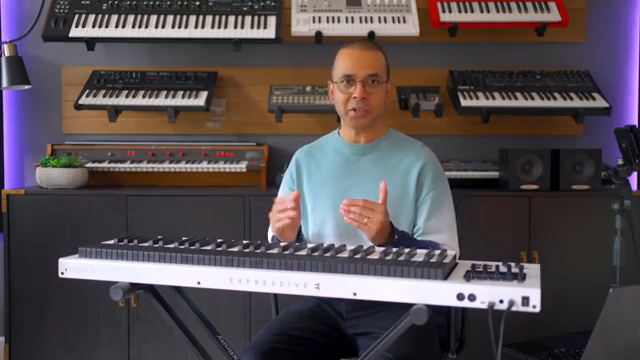
Andrew Huang wastes no time—Expressive E’s Osmose CE isn’t just a stripped-down version of their flagship, it’s a controller with attitude. Forget built-in sounds; this beast is all about tactile play and raw expression. The price is nearly halved, but the feature set stays wild, minus the internal engine. You’re getting the same keybed and the same game-changing performance tricks as the original, just ready to boss around your favourite synths instead.
Andrew’s love for the original Osmose is clear, but he’s quick to point out that the CE is no consolation prize. It’s a full-on performance weapon for anyone who wants their MIDI controller to fight back. If you’re bored of lifeless keys, this one’s got enough personality to start a synth mutiny.
Bend, Press, Lift: Expression Goes Turbo
The Osmose CE isn’t content with just velocity and aftertouch—it’s a playground for pitch bending, pressure glides, and all sorts of finger acrobatics. Each key can be wiggled left or right for pitch bends, and you can dial in exactly how much you want. Pressure glide lets you morph between notes based on finger force, not some boring global setting. It’s like having a whammy bar for every finger, and the envelope shaping responds to your touch with surgical precision.
Polyphonic aftertouch? Check. But there’s more: the lift gesture means letting go of a key can trigger an extra note or a subtle variation, depending on how you release. It’s a tactile buffet—every gesture is mapped to something musical, and Andrew shows how it all adds up to a keyboard that feels alive. If you want to see just how deep the rabbit hole goes, you’ll need to watch the video for the full finger ballet.
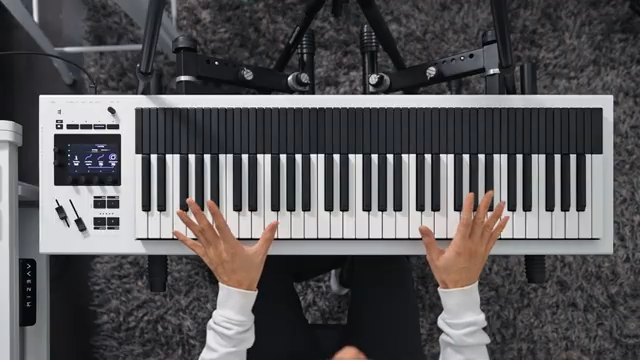
"You can move any key left or right to bend its pitch."
© Screenshot/Quote: Andrewhuang (YouTube)
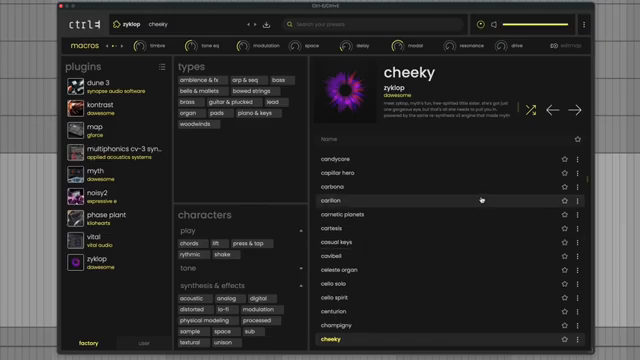
Ctrl-E: The Plugin Playground
"It ships with over 900 presets that are optimized to use these expressive gestures."
© Screenshot/Quote: Andrewhuang (YouTube)
Here’s where things get spicy: the Osmose CE comes bundled with Expressive E’s new Control E plugin, and it’s not just a token freebie. Over 900 presets, all optimised for the CE’s wild gestures, and a browser that actually makes sense. Andrew highlights how you can dive into categories and even access presets for third-party synths—whether you own them or not. If you do, you get full editing; if not, you still get eight macros to twist sounds into new shapes.
Vital and Zyklop are free, so you can go deep without spending extra. The plugin is a proper sound playground, letting you use the CE’s expressive arsenal to its fullest. Andrew’s demo is a blur of macros, presets, and sound-mangling—if you want to see how far you can push it, you’ll need to check out his hands-on chaos.
DAW Domination: Seamless Integration
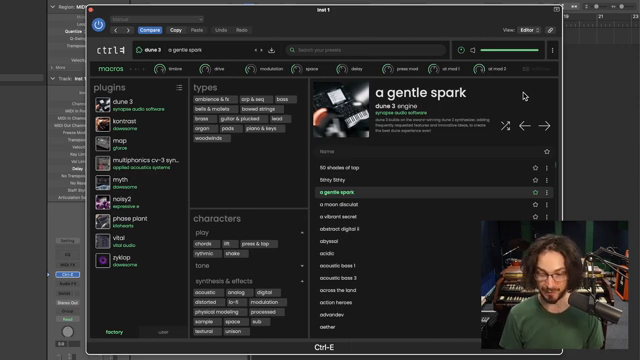
Integration is where most controllers fall flat, but the Osmose CE actually delivers. Andrew walks through DAW Control Mode—Cubase, Ableton, Bitwig, Logic, all covered at launch. You can browse presets, tweak macros, and jump between tracks without menu-diving hell. The four knobs are smart: click to swap top/bottom, hold shift for momentary jumps, and you’re never stuck in the wrong tab.
Transport controls, metronome, loop brace, track selection, volume, pan, mute, solo—it’s all there, and most of it works without leaving your creative flow. There’s even quantise-on-the-fly with a shift combo. Andrew doesn’t cover every last menu, but it’s clear this thing is built for real-world use, not just spec-sheet flexing. If you want to see the workflow in action, the video’s got all the knob-twiddling you crave.

"At launch, they're supporting Cubase, Ableton, Bitwig, and Logic, but they're planning to add some more."
© Screenshot/Quote: Andrewhuang (YouTube)
Affordable Mayhem: The CE Advantage
Here’s the kicker: the Osmose CE slashes the price, making all this expressive madness way more accessible. Andrew’s not shy about saying it—this isn’t just a budget version, it’s a proper tool for anyone who wants to level up their MIDI game without selling a kidney. If you’ve been eyeing the original Osmose but couldn’t justify the spend, the CE is your ticket to the tactile rave. Don’t sleep on it—this controller is ready to start trouble in any studio.
This article is also available in German. Read it here: https://synthmagazin.at/andrew-huang-entfesselt-das-osmose-ce-taktile-midi-revolution/
More articles about these products:
Watch on YouTube:
Latest articles
Watch on YouTube:
Visit the channel:
https://www.youtube.com/andrewhuang
https://www.youtube.com/andrewhuang
Links from andrewhuang:
Instagram: https://instagram.com/andrewismusic
Facebook: https://facebook.com/andrewismusic
Bandcamp: https://andrewhuang.bandcamp.com
My plugin: https://babyaud.io/transit
My book: https://andrewhuang.com/book
My online class: https://studio.com/andrew
Flip Sampler: https://flipsampler.com
Join my Patreon: https://patreon.com/andrewhuang
Join my Discord: https://discord.gg/Fu8zwbFQAa
Sponsored links:
If you purchase via these links, we may earn a small commission – at no extra cost to you. The link opens an Amazon keyword search, and results may vary depending on availability.
Expressive E Control E plugin
🔗 Check price on Amazon
🔗 Check price on Amazon
Expressive E Osmose CE
🔗 Check price on Amazon
🔗 Check price on Amazon