The Catalyst Controller from 4ms Company lands squarely in the territory of hands-on, voltage-driven modular control. As a macro controller with eight independent channels, it’s designed to bring tactile, scene-based manipulation to Eurorack rigs—whether you’re shaping pitch, modulating effects, or orchestrating complex voltage morphs. In this in-depth demo, 4ms’s practical, educational approach shines through, with clear patch examples and a focus on real-world workflows. If you’re curious about how macro control can transform your patching, this video is a thorough, patch-oriented tour of the Catalyst Controller’s capabilities.
5. April 2024
MILES
4ms Company Catalyst Controller: Macro Control in the Modular Realm
Meet the Macro: Catalyst Controller Unveiled
The video opens with an introduction to the Catalyst Controller, 4ms Company’s latest foray into macro control for Eurorack. This module is presented as an 8-channel macro controller, offering users a way to manage multiple parameters or destinations from a single front panel. Each channel is equipped with its own knob and output, allowing for direct, hands-on voltage control across your system.
4ms’s approach here is to provide a flexible tool that can serve as a central hub for pitch, modulation, or effect parameters. The video clarifies that the Catalyst Controller shares hardware with the Catalyst Sequencer—switchable via a simple panel flip and firmware change—though this demo focuses solely on the controller side. The emphasis is on how the module can act as a preset manager, a performance tool, or a voltage source for creative patching.
Voltage, Quantization, and Scene Wizardry
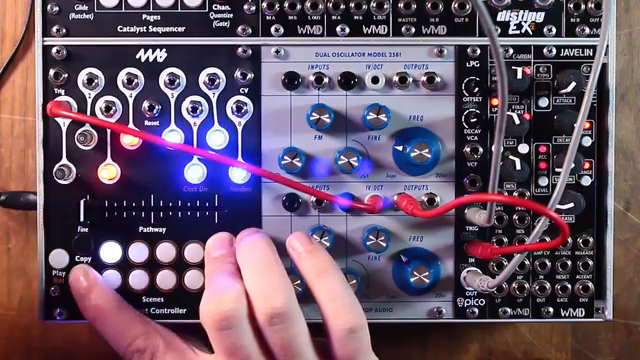
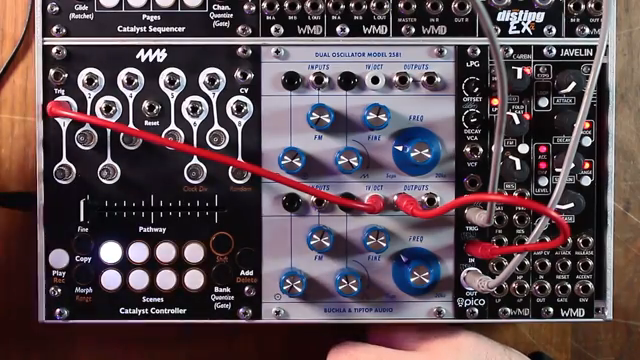
Diving into the core features, the demo shows how each channel can output voltages suitable for pitch, parameter control, or gates. The presenter patches channel 1 directly into an oscillator’s volt-per-octave input, demonstrating how knob turns translate to pitch changes, with LEDs providing immediate visual feedback—blue for positive, red for negative voltages.
Quantization is a highlight: each channel can be set to various scales, from unquantized to chromatic, major, minor, and more. This per-channel quantization makes it easy to dial in musical intervals or microtonal values, especially with the fine adjustment mode for precise tweaks. Gate mode transforms a channel’s output into a gate signal, ideal for triggering envelopes or samples whenever a scene is recalled. Scene management is robust, allowing users to store and recall voltage setups across all channels, effectively turning the module into a powerful preset system for modular rigs.
"There are different levels of quantization and scales for these outputs that can be set per channel."
© Screenshot/Quote: 4Mscompany (YouTube)
Voltage Ranges: Dialling in Precision
"You can really dial in the amount of voltage range available on each knob."
© Screenshot/Quote: 4Mscompany (YouTube)
A key strength of the Catalyst Controller is its ability to assign different voltage ranges to each channel. By accessing the range function, users can select from bipolar and unipolar settings—such as -5V to +5V, 0V to 5V, or even 0V to 1V—tailoring each output to the needs of the destination module.
This flexibility ensures that whether you’re controlling pitch, filter cutoff, or CV inputs with narrower voltage requirements, the controller can adapt. The video demonstrates how these ranges can be set quickly, making the module equally at home modulating audio-rate parameters or subtle effect depths. The ability to fine-tune voltage ranges per channel is a boon for precise sound design and live performance control.
Scenes, Pathways, and Morphing: Creative Control in Action
The demo moves into the heart of the Catalyst Controller’s creative potential: scenes and crossfader-based transitions. Scenes store the state of all eight channels, and the crossfader—dubbed the Pathway—lets users interpolate smoothly between scenes, morphing voltages in real time. Adding, deleting, and replacing scenes in the Pathway is straightforward, and scenes can be copied or pasted for rapid setup.
Morphing behaviour can be tailored per channel, allowing for linear fades or sharp transitions between scenes. Slew control, set globally, smooths out voltage changes for more organic modulation. The presenter shows how recording crossfader movements enables playback of complex transitions, either manually or triggered by external clocks or gates. This suite of features turns the Catalyst Controller into a dynamic performance instrument, capable of nuanced voltage choreography across a modular setup.

"The next thing I want to explain is the morphing functions and the different styles of morphing."
© Screenshot/Quote: 4Mscompany (YouTube)
Patch Examples: Macro Modulation and FX Mastery
To ground the feature set in real-world use, the video presents two patch examples. In the first, the Catalyst Controller modulates multiple parameters of a synth voice—release, resonance, FM depth, and more—demonstrating how macro control can inject life and movement into a patch. The crossfader is used to morph between energy levels, with scenes set up for different musical moments.
The second example shifts focus to effects control. Here, the Catalyst Controller is patched into a performance mixer’s send/return loop, managing high-pass filtering, delay, and reverb across different scenes. By assigning scenes to different effect combinations and using the crossfader to blend between them, the module becomes a master effects controller, ideal for live performance or dramatic transitions in a modular set.
Blind Mode, Classic Mode, and State Saving: Utility for the Modular Performer
Rounding out the feature set, the video covers several workflow enhancements. Blind mode allows users to prepare scene changes silently, only activating them when the crossfader reaches the target—perfect for stealthy effect swaps or parameter shifts during a set. Classic mode restricts the Pathway to two points, echoing the original Catalyst’s behaviour and simplifying transitions for straightforward A/B morphing.
State saving ensures that all scenes and banks can be stored and recalled after power cycles, a practical touch for those who want consistency between sessions. These features, while not the flashiest, address the needs of modular performers who demand reliability and flexibility from their control modules.
This article is also available in German. Read it here: https://synthmagazin.at/4ms-company-catalyst-controller-makrosteuerung-im-modularsystem/
Watch on YouTube:
Latest articles
Watch on YouTube:
Visit the channel:
https://www.youtube.com/4msCompany
https://www.youtube.com/4msCompany
Links from 4msCompany:
website: https://4mscompany.com
instagram: https://instagram.com/4ms_company
facebook: https://www.facebook.com/4mscompany
Sponsored links:
If you purchase via these links, we may earn a small commission – at no extra cost to you. The link opens an Amazon keyword search, and results may vary depending on availability.
4ms Catalyst Controller
🔗 Check price on Amazon
🔗 Check price on Amazon